How to Add Your Neighborhood to Your Swaphouse Listing
Where your home is located is one of the first things other members want to understand. If you live in a bigger city, you can now add your neighborhood to your listing, sharing a bit more specifically where you are without revealing your full address.
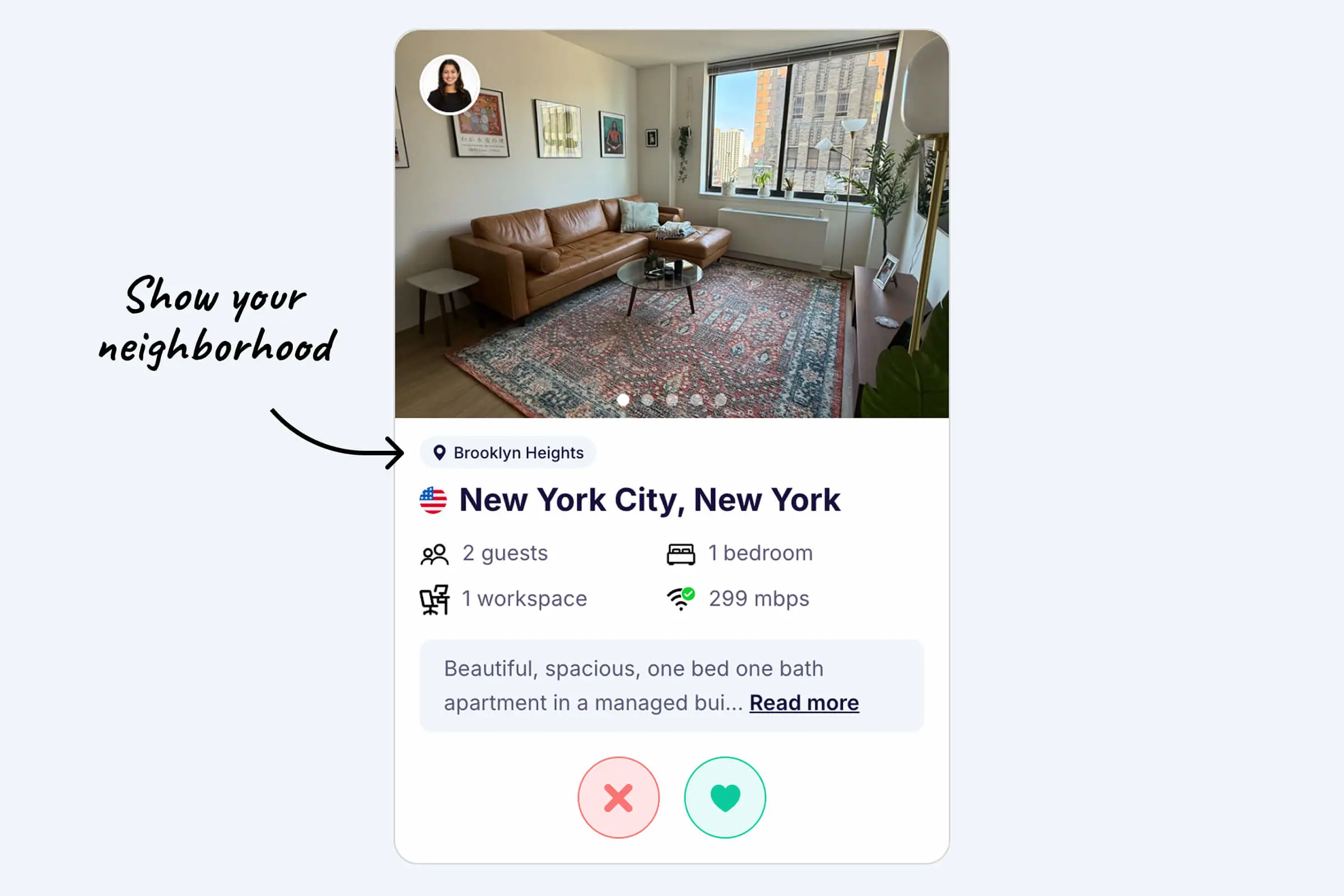
In a big city, "I live in Berlin" or "I live in Paris" only tells half the story. Mitte feels nothing like Kreuzberg, and Le Marais is a different world from La Défense. Adding your neighborhood closes that gap. It gives other members better context about the area, helps them understand which part of the city your home is in, and makes your listing feel more informative and useful at a glance.
Once added, your area appears directly on your listing together with a clearer map, so potential swappers get an accurate sense of where they would actually be staying. Best of all, it takes less than a minute to set up.
Why add your neighborhood?
Your exact address always stays private on Swaphouse. But sharing your neighborhood, district, or local area gives members just enough context to picture daily life in your home, without compromising your privacy.
Here is what a clear area does for your listing:
What a neighborhood adds to your listing
- Better matches: members can tell at a glance whether your part of the city fits the trip they have in mind, which means more relevant matches and fewer mismatched conversations.
- More trust: a specific, recognizable area makes a listing feel genuine and well cared for, rather than vague.
- A real feel for daily life: the neighborhood hints at the vibe, the commute, the cafes around the corner, and what an ordinary day there might look like.
- More clicks and interest: a listing that says "Gracia, Barcelona" simply invites more curiosity than one that says "Barcelona."
It is a small detail, but it is often the difference between a listing someone scrolls past and one they stop to explore.
How it works
Adding your area takes less than a minute. Watch the quick walkthrough below, then follow the steps.
- Log in to Swaphouse.io
- Open your Home Listing and go to Location
- Type in your neighborhood, district, or area
- Hit Save, that's it
Your area will then show up on your listing alongside a clearer map. You can update or remove it anytime from the same place.
Which homes should add an area?
This feature is mainly meant for homes in larger cities where neighborhoods, districts, or similar local areas are commonly used. In those places, the area carries a lot of meaning and instantly tells members what to expect.
For smaller towns or places where neighborhoods are less relevant, it is usually not needed, the town name already says enough. But you are always free to add it if a local area or district helps describe where you are.
A few examples by city
- New York: Brooklyn, Manhattan, Queens, Williamsburg
- London: Notting Hill, Brixton, Camden, Shoreditch
- Paris: Le Marais, Montmartre, 4th arrondissement
- Berlin: Mitte, Kreuzberg, Friedrichshain
- Barcelona: Gràcia, El Born, Eixample, Poblenou
- Rio de Janeiro: Copacabana, Ipanema, Leblon, Botafogo
- Tokyo: Shibuya, Shinjuku, Asakusa, Ebisu
Tips for choosing the right neighborhood name
A neighborhood is most useful when other members instantly recognize it. A few tips to get it right:
- Use the name locals actually use. That is usually the one other members will recognize too, and the one that shows up when travelers research a city.
- Pick the recognizable district over a hyper-local micro-area. If your tiny pocket sits inside a wider, well-known neighborhood, the bigger name often gives clearer context to someone who has never visited.
- Think like a traveler. Choose the name people would search for or mention when deciding where to stay, not just the official administrative label.
- Keep your address private. Add the area or district only, there is no need to get more specific than that. Your exact location stays protected.
- Keep it consistent with the rest of your listing. Make sure your area matches what you describe in your home description and lines up with the location members see, so everything tells the same story.
Tip: If you are unsure, imagine a friend from another country asking "which part of the city do you live in?" The answer you would give them is usually the perfect neighborhood to add.
What it looks like on your listing
Once you save your area, it appears directly on your home listing, paired with a clearer map of the surrounding location. Members exploring your listing immediately understand which part of the city your home is in, without ever seeing your full address.
It is a simple way to make your listing more informative, more trustworthy, and more inviting, all in under a minute.

How to list your home on Swaphouse
New to Swaphouse or polishing your listing? See the full walkthrough, from sign-up to a live listing that gets you more matches.
About Swaphouse
Imagine exploring the world without paying for pricey hotels or short-term rentals. At Swaphouse, we believe home swapping should feel more personal, more flexible, and more community-driven. Join Swaphouse and discover a smarter way to travel and work remotely.




Community Comments
Join the Conversation
Sign in to share your tips and experiences with the community